ملحمة الكلمات : كلمات متقاطعة
- 4.5
- Rating
- 100.00K
- Installs
- Free
- Price
 Analysis by App-foxy
I approached ملحمة الكلمات: كلمات متقاطعة as the kind of word game I could open for a short mental break rather than as a title demanding a long uninterrupted session. It is a free puzzle game from Alborda Games Oy, built around riddles and crossword-style challenges. The idea is familiar, but that familiarity is part of its appeal: I do not need to learn a complicated control scheme before getting started, and the central task is clear from the first puzzle.
What makes this particular release worth considering is the combination of a simple word-game format and a broad audience. It carries an Everyone age rating, works on Android devices running version 7.0 or later, and has reached more than 100,000 installs. Its average score is 4.4 from roughly 2.8 thousand ratings, which suggests that many players find the basic experience enjoyable. I would still treat those figures as a starting point rather than a guarantee, because crossword enjoyment depends heavily on language comfort, clue style, and patience with difficult answers.
How the game feels during ordinary play
My first impression is that this is a low-friction game. Word puzzles are naturally suited to short sessions: I can solve one clue, pause, and return later without needing to remember a complicated sequence of actions. That makes it a practical choice for a commute, a waiting room, or the few minutes before bed. The format also gives the brain something more active to do than simply scrolling through a social feed.
You May Also Like

 Blood Strike: 2.5 Anniversary
Blood Strike’s Loadouts Turn Every Drop Into a Tactical Gamble
A close look at Blood Strike’s custom loadouts: how fast access to signature weapons reshapes its battle royale rhythm, rewards preparation, and narrows the gap between fights.

 Pandora - Music & Podcasts
Pandora’s Music Is Easy to Start, but Harder to Recover
Pandora’s strength is its low-effort path from a seed to a station. Its weak spot is how much confidence it asks you to place in connection, setup, and quiet recovery.

 8 Ball Pool
8 Ball Pool Is Built on Rivalries, Rematches, and Routine
A close look at the rivalries, rematches, shared routines, and unanswered safety questions that turn a quick pool match into a persistent mobile community.

 Samsung Music
Samsung Music’s Quiet Strength Is Playing What You Already Own
Its reach comes less from spectacle than from dependable access to a personal library. That simplicity is both the app’s strongest retention engine and its ceiling.

 AccuWeather: Weather Radar
AccuWeather Review: A Quick, Clear Forecast for Everyday Decisions
For everyday plans, the best forecast is the one you can understand quickly. AccuWeather makes rain timing, radar, and local conditions easy to act on, with a few trade-offs.

 Hill Climb Racing
Why Hill Climb Racing Still Turns Crashes Into One More Run
A tiny car, a bumpy hill and one more upgrade: Hill Climb Racing keeps resurfacing because its simple chaos makes every near-miss feel personal.
More From Our News Desk



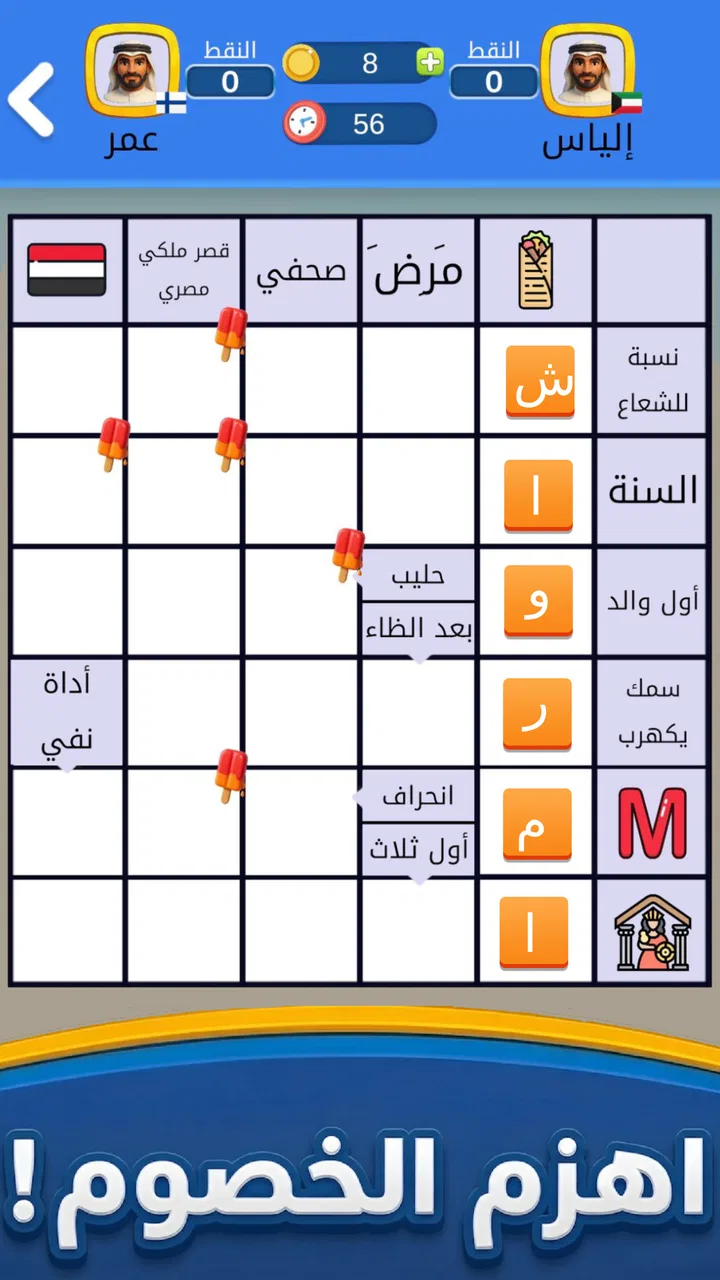
The riddles are the main reason to stay with it. A crossword clue can feel satisfying when the wording points toward an answer without giving it away immediately. I like that this format rewards several kinds of thinking at once: vocabulary, spelling, association, and the ability to use nearby answers as hints. When I get stuck, I usually stop trying to force the first answer that comes to mind and instead inspect the letters already available. That small change in approach is often more useful than randomly guessing.
The game is best understood as a casual word challenge, not as a replacement for a full newspaper crossword collection or a highly specialized vocabulary trainer. Players who enjoy carefully constructed, very difficult crosswords may eventually want more depth or a different style of clue. On the other hand, someone who wants approachable riddles with a familiar layout may find the presentation easier to enter than a more demanding traditional puzzle app.
The strongest everyday use is a focused five-minute break. I can play while waiting for an appointment, then put the phone away without feeling that I have abandoned a long campaign. That matters because many mobile games are designed around extended progression, while a crossword can provide a complete sense of activity in a much smaller window. It is also a reasonable option for families, although younger players may need help with unfamiliar vocabulary even though the age classification is Everyone.
Speed expectations and the first few minutes
In normal use, I expect a word game with this scope to feel quick to open and straightforward to navigate, especially on a reasonably modern Android phone. The current version is 1.19.2, so this is not presented as an untouched early build. Still, I would not judge the experience solely by how quickly the first screen appears. The more important question is whether entering a puzzle, typing an answer, and moving between clues feels immediate enough that the interface does not interrupt the thinking process.
That distinction is important for crossword games. A tiny delay after every letter can become irritating because the player is making many small inputs. A slower transition between occasional screens is easier to tolerate than sluggish typing or a board that reacts late. When I assess a game like this, I pay attention to whether the interaction stays out of the way. The best result is almost invisible: I think about the clue, enter the answer, and continue without having to manage the app itself.
Players using older phones should keep expectations sensible. Android 7.0 compatibility makes the game available to a wide range of devices, but compatibility does not mean every handset will offer the same smoothness. Hardware age, available storage, background activity, and the condition of the operating system can all affect how any app behaves. I would close demanding apps before a long puzzle session on an older device, not because this game is known to be heavy, but because reducing competition for memory is a practical way to avoid interruptions.
Another useful habit is to let the game settle after opening it. If a puzzle screen takes a moment to appear, repeatedly tapping can create accidental inputs or make the interface feel less predictable. I prefer one deliberate tap, a short pause, and then entering an answer. That is a small workflow improvement, but it is especially helpful for players using budget phones or devices that have been running for several days without a restart.
What happens during heavier use
The demanding part of this game is unlikely to be graphical complexity. The real heavy-use moment is mental rather than visual: moving through many clues, checking intersecting letters, revisiting an answer, and deciding whether a clue is genuinely difficult or simply being read too narrowly. That makes the title suitable for longer sessions when I want a calm concentration exercise, although the experience can become repetitive if I keep playing after my attention has faded.
For extended sessions, I recommend treating each puzzle as a small unit instead of trying to clear everything in one sitting. I first fill the answers I am confident about, then use the crossing letters to narrow down uncertain clues. After that, I return to the stubborn entries with a fresh interpretation of the wording. This approach is more efficient than starting at the top and forcing every clue in order, and it reduces the temptation to spend too long on one answer.
There is also a practical trade-off between using help and preserving the challenge. If the game offers assistance within a puzzle, I would reserve it for moments where one missing answer is blocking several crossings rather than using it immediately. A hint can restore the flow, but frequent help may turn the activity into answer collection instead of problem solving. Players who want a pure test of vocabulary should be careful about that balance; players who mainly want relaxation may reasonably prefer a faster route through difficult clues.
The commercial model deserves attention during heavier use. The game is free to install, while individual in-app purchases range from $0.99 to $84.99. That wide range means I would check the wording and purpose of any purchase before confirming it, particularly if a child might use the device. A free starting point is convenient, but the overall value depends on how comfortable you are with optional spending and whether you can enjoy the puzzles without feeling pushed toward extra purchases.
I would also avoid making a purchase simply because I am stuck on one clue. Taking a break is often the better solution in a word game: after a few minutes away, a familiar phrase or alternate meaning can become obvious. This is one of the few puzzle genres where patience can replace spending. If you know you are easily tempted by paid assistance, setting a personal rule before playing is sensible.
Reliability, returning to a puzzle, and recovery
A reliable crossword game should make returning feel safe and uncomplicated. I want to be able to pause during a clue, answer a message, lock the screen, and come back without losing the thread of what I was doing. Crossword play naturally involves interruptions, so recovery is more important here than in a game where every session is a continuous action sequence.
My practical advice is to finish an entry before switching away whenever possible. That gives the game a clean point to preserve and reduces the chance of returning to an unfinished input. If the app has been left in the background for a long time, I would also check the puzzle state before continuing rather than assuming that every tap registered exactly as intended. This is not a criticism of a confirmed defect; it is simply a sensible habit on mobile devices, where the operating system may close or refresh background apps.
If the game ever behaves unusually after a long session, the least disruptive recovery path is straightforward: leave the puzzle, reopen it, and check whether the current answers remain in place. On an older handset, restarting the phone can also clear temporary pressure from other apps. I would not jump immediately to reinstalling, because that can create unnecessary risk for any locally stored progress. The better sequence is to close, reopen, and restart only when needed.
Stability also includes the feeling of control around purchases and interruptions. A puzzle app should let me concentrate on clues rather than making me wonder whether a tap has opened an offer or whether an accidental touch will lead somewhere unexpected. Since this title includes paid items, I would use the device’s purchase protections and avoid handing the phone to a child without supervision. That is a general mobile-safety measure, but it matters more when a free game presents optional spending.
The developer, Alborda Games Oy, has released the game in a current version that indicates ongoing maintenance rather than a one-off experiment. I see that as a positive sign for compatibility and refinement, although a version number alone cannot promise perfect behavior on every phone. My confidence would be highest on a device that meets the operating-system requirement comfortably and has enough free space for normal app updates.
Device constraints and who should choose it
The minimum operating-system requirement is Android 7.0, which keeps the potential audience fairly broad. If your phone cannot run that version, this is not the right choice for that device. If it can, the next considerations are more personal: screen size, typing comfort, eyesight, and whether you prefer solving clues by touch. A small display may make a dense crossword less comfortable, while a larger phone or tablet-like screen can make letter placement easier to inspect.
Resource demands are likely to be modest compared with visually intense games, but I would still avoid judging performance while the phone is nearly full or overloaded with background processes. Storage pressure can affect updates and general responsiveness even when the game itself is simple. Keeping some free space, closing unused apps, and installing the latest available version are ordinary steps that give any puzzle title a better chance of behaving consistently.
Battery expectations are also different from those of a three-dimensional action game. A word puzzle generally asks more from the player’s attention than from the phone’s graphics hardware. That makes it a better companion for low-key use, such as solving during a train ride or while sitting in a café. I would not promise identical battery behavior across devices, but the format itself is less likely to be the reason a phone feels heavily taxed.
People who are learning English or another supported language should think carefully about clue vocabulary before committing to long sessions. Riddles can be enjoyable language practice because they expose you to synonyms and common expressions, but they can also feel unfair when the issue is language nuance rather than reasoning. For that audience, the game is best used with a dictionary nearby or alongside a friend who enjoys explaining word choices.
It is less suitable for players seeking fast reflexes, competitive multiplayer pressure, or a large visual world to explore. I would also point experienced crossword enthusiasts toward a more specialized alternative if they need a particular newspaper style, advanced cryptic clues, or a carefully curated difficulty ladder. Those are not failures of this game; they are signs that its casual riddle-and-crossword identity will suit some players much better than others.
How it compares with familiar word-game alternatives
Compared with a daily single-puzzle word game, this title offers a more crossword-oriented rhythm. A daily format can create a strong routine and a clear limit, while a broader puzzle app may be easier to open whenever you happen to have time. I prefer the latter when I want flexibility, but I understand why someone who enjoys a small shared daily ritual might choose a different option.
Compared with a traditional newspaper crossword, the phone format is more convenient and forgiving. I do not need a pen, an eraser, or a flat surface, and I can work through clues in any order. The trade-off is that the digital experience may feel less tactile and less ceremonial. Players who love the physical act of filling a grid may find a printed puzzle more satisfying, even if this game is easier to carry.
Compared with word searches, anagrams, or rapid spelling challenges, crossword riddles ask for more interpretation. The answer is not always visible as a group of letters waiting to be rearranged; I need to understand the clue and use the crossings. That makes the game a better fit for reflective play than for quick pattern spotting. If I am tired and want something almost automatic, a simpler word game may be more relaxing.
One non-obvious advantage is that the crossword structure gives partial knowledge real value. Even when I do not know an answer, a few crossing letters can transform a vague clue into a manageable one. That makes the game more accessible than a list of unrelated riddles, where being stuck on one question provides no help with the next. The limitation is that a poorly understood clue can still block progress, so the experience depends on whether the wording matches your vocabulary and expectations.
My performance verdict
After weighing the style, device requirements, free entry point, and potential purchase range, I see ملحمة الكلمات: كلمات متقاطعة as a sensible choice for casual word-puzzle fans who want an easy game to pick up and put down. Alborda Games Oy has kept the concept recognizable, and the Everyone rating makes it suitable for a wide audience in principle. The real test is not whether you enjoy crossword mechanics generally, but whether this particular riddle-focused approach matches your preferred level of challenge.
On performance, I would expect the best experience from a phone that runs Android 7.0 or newer without storage or background-app pressure. The game’s format should be less demanding than a graphics-heavy title, but smooth typing, dependable puzzle recovery, and comfortable reading still matter. I would install it for short sessions first, observe how it feels on my own device, and only then decide whether the optional purchases add enough value for my habits.
The rating of 4.4 and more than 100,000 installs make it look established enough to try without treating it as an unknown experiment. Its free price lowers the barrier further, while the paid items mean I would keep purchase controls in place. For a parent, I would explain that free installation does not mean every part of the experience is free. For an adult player, I would simply decide in advance whether hints or other extras fit the budget.
My final recommendation is positive but specific: choose it if you want a lightweight, clue-driven way to exercise vocabulary during ordinary downtime. Skip it if you need advanced crossword construction, competitive play, or a clearly defined daily challenge. I would especially recommend trying the five-minute routine first—solve the obvious entries, use crossings intelligently, stop before frustration takes over, and return later. That method brings out the game’s strongest quality: it turns a small amount of spare time into a focused mental break without requiring a major commitment.
FAQs for ملحمة الكلمات : كلمات متقاطعة
01What is ملحمة الكلمات : كلمات متقاطعة?
ملحمة الكلمات : كلمات متقاطعة is a crossword-style word puzzle game designed for players who enjoy testing their vocabulary, spelling, and general knowledge. It presents clue-based challenges that require you to connect answers and complete word grids. The game is suitable for casual sessions, although some puzzles may become increasingly demanding as you progress through its collection of levels.
02How do you play ملحمة الكلمات : كلمات متقاطعة?
Gameplay is based on solving crossword clues and entering the correct words into the available grid. You normally read the hints, identify the answer, and place the letters in their corresponding spaces. When you are unsure, you can use the available assistance options if provided, or return to the puzzle later. Careful reading and familiarity with Arabic vocabulary are especially helpful.
03Is ملحمة الكلمات : كلمات متقاطعة suitable for beginners?
Yes, the game can be a good choice for beginners who are familiar with Arabic words and enjoy relaxed brain-training activities. Early puzzles generally help players understand the clue and grid system before the challenges become more complicated. However, difficulty can vary depending on your vocabulary and knowledge, so occasional use of hints may be necessary for less familiar subjects.
04Does ملحمة الكلمات : كلمات متقاطعة require an internet connection?
The basic puzzle experience may work without a constant internet connection, which is convenient when playing during travel or in places with limited coverage. Nevertheless, certain functions—such as advertisements, updates, online services, progress synchronization, or additional content—may depend on connectivity. It is best to open the game online at least once after installation and check which features remain available offline.
05Is ملحمة الكلمات : كلمات متقاطعة free to download and play?
The game is generally available to download at no initial cost, allowing users to try its crossword challenges without purchasing the application first. Like many free mobile puzzle games, it may include advertising, optional hint purchases, or other in-app features. Before downloading, review the store listing for the current pricing, permissions, supported device versions, and any available in-app purchase information.
Pros
- Large Arabic word database keeps puzzles varied and replayable.
- Helpful hints make difficult clues more accessible to casual players.
- Short levels fit well into quick breaks or daily play sessions.
- Improves Arabic vocabulary
- spelling
- and general knowledge through play.
- Simple controls make the game comfortable on phones and tablets.
Cons
- Some puzzles may rely on regional Arabic vocabulary unfamiliar to everyone.
- Repeated clue styles can make later stages feel less varied.
- Hints may become limited unless players watch ads or use earned rewards.
- Small text or dense layouts may be uncomfortable on compact screens.
- Offline availability and progress syncing may vary by device or version.

ملحمة الكلمات : كلمات متقاطعة
Gallery